
JJY Signal Simulator with ESP32 — 5m Range DIY Build
I have a Muji radio-controlled clock on my desk in Poland. It’s designed to sync itself automatically every night — but it can’t. The clock is hardwired to listen for the JJY longwave signal broadcast from Japan at 40 kHz, and that signal never reaches Europe. So the clock sat there, a self-correcting device that couldn’t correct itself, updated by hand like it was the 1990s.
The fix was to bring the signal to it: a local transmitter that synthesizes the JJY protocol, strong enough to reach the clock from another room.
How JJY Works
JJY transmits time as Binary Coded Decimal (BCD) pulses on a 40 kHz carrier wave. Each second, the carrier is briefly cut into one of three pulse widths:
- 200ms off — position marker
- 500ms off — binary
1 - 800ms off — binary
0
A full minute of these pulses encodes the current time: hours, minutes, day of year, and year. The clock’s receiver listens for this pattern on a nightly schedule and sets itself to the exact second. The protocol is well-documented and the ESP32’s PWM timers can generate the 40 kHz carrier and chop it precisely — no specialized RF hardware needed. The only challenge is generating enough magnetic field strength to reach a clock more than a few centimeters away.
Parts
| Component | Detail |
|---|---|
| ESP32 DevKitV1 (ESP-WROOM-32) | Logic controller and Wi-Fi |
| L9110S dual-channel motor driver | H-bridge power amplifier |
| 2× 50mm NiZn ferrite rods | Bonded to form 100mm core |
| 10m enameled copper wire, 0.3mm | 250–300 turns on the coil (won’t need all of it) |
| 1.5 nF Philips MKP film capacitor | Parallel LC resonance |
| 100 pF SL ceramic disc capacitor | Parallel LC resonance |
| Narrow solderless breadboard | Half-hanging ESP32 layout |
| DuPont jumper wires | — |
| Micro-USB cable + 5V supply | Powers the ESP32 and L9110S |
| Cyanoacrylate adhesive | Bonds the two ferrite rods |
Circuit
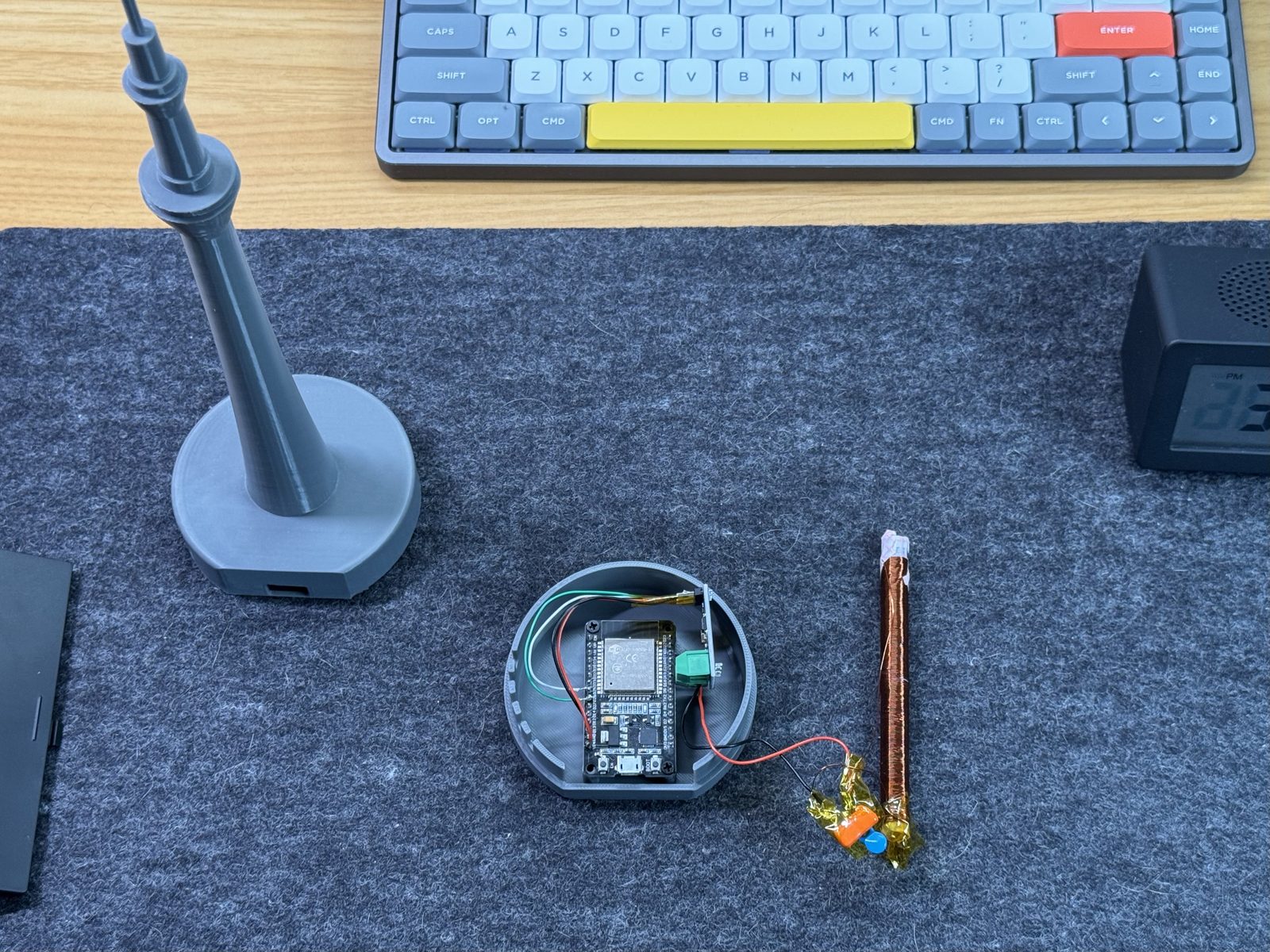
The ESP32 alone can’t drive a coil hard enough to produce useful range — its GPIO pins output 3.3V logic signals with very little current capacity. The L9110S solves this. It’s a dual H-bridge motor driver, and here it acts as a power amplifier: GPIO 25 feeds the carrier signal into Input A (IA), and GPIO 26 feeds the inverted 40 kHz signal into Input B (IB). Both channels are driven in antiphase — when one output is high, the other is low — and the coil is connected across both outputs. This differential drive doubles the effective voltage swing across the coil, giving a 10V peak-to-peak output from a 5V supply without any boost converter.
Antenna: The LC Tank Circuit
The transmitter’s range comes from a parallel LC resonant circuit tuned to exactly 40 kHz. At resonance, energy circulates between the inductor and capacitor with minimal loss, building up a circulating current that far exceeds what the driver alone could sustain.
Building the coil:
- Bond two 50mm NiZn ferrite rods end-to-end with cyanoacrylate to form a 100mm core. Let it cure fully.
- Wind the enameled wire tightly onto the rod in a single layer — 250 to 300 turns — leaving about 1cm of bare rod at one end. At 0.3mm wire diameter this fills the winding length exactly.
- Scrape 2cm of enamel off each tail to expose bare copper for soldering.
The capacitor bank is two capacitors wired in parallel with the coil:
- 1.5 nF Philips MKP film capacitor
- 100 pF SL ceramic disc capacitor
This combination resonates the coil at 40 kHz. The ceramic disc trims the resonance; the MKP film cap does the heavy lifting. If you substitute different capacitor types, recheck your resonant frequency with an oscilloscope or function generator before relying on the range.
Will This Harm a Watch?
Short answer: no. Two things keep it safe.
First, the field drops fast with distance — magnetic field strength falls with the inverse cube of distance, so even a few centimetres from the rod it’s already a small fraction of the surface value.
Second, and more importantly: the field alternates at 40,000 Hz. A static field can permanently align the magnetic domains in a steel hairspring; a 40 kHz AC field can’t sustain that alignment long enough to do so. It acts more like a mild degausser than a magnetizer. Put your Seiko 5 on the desk next to this and it will be fine.
Firmware
On startup the ESP32:
- Connects to Wi-Fi
- Syncs system time against
pool.ntp.orgwithtime.google.comas fallback - Applies the POSIX timezone string
CET-1CEST,M3.5.0/2,M10.5.0/3to handle Warsaw daylight saving time automatically
The 40 kHz carrier is generated using the ESP32’s MCPWM peripheral in antiphase mode — GPIO 25 and GPIO 26 carry inverted copies of the same signal, which is what drives the L9110S differentially. The firmware then shapes the carrier into the 200ms / 500ms / 800ms BCD pulses that encode the current time, with a 5ms soft ramp on each symbol edge to reduce switching transients.
To avoid unnecessary RF interference and continuous power draw, the transmitter runs on a 4-slot daily schedule: 01:16, 04:16, 13:16, and 16:16 local time — each window is exactly 5 minutes long. Between slots the ESP32 enters deep sleep, waking automatically 2 minutes before each slot to reconnect Wi-Fi and resync NTP before transmission begins. On the very first power-up there’s a 10-minute cold-boot broadcast, useful for confirming the clock can receive the signal before the scheduled windows take over.
Web Interface
The ESP32 runs a local web server for configuration without reflashing:
- Timezone — set the POSIX timezone rule for your region (JST, UTC, Warsaw, or any custom rule), so the transmitter broadcasts local time rather than hardcoded JST
- Mode toggle — switch between the automatic sleep schedule and a manual override mode that keeps the transmitter running continuously, useful while testing
- Deep sleep control — manually request sleep, or pause it while you have the web interface open
Getting the carrier frequency right takes iteration. The web interface keeps the transmitter running in override mode while you adjust the frequency via serial commands (+/-), watching the clock respond — then flip back to scheduled operation without reflashing.
Range
Most DIY JJY simulators top out at a few centimeters — the watch has to sit directly on top of the coil because the field is too weak to reach further. The difference here is the tuned LC circuit: without resonance, the driver pushes current through the coil once and it dissipates. With resonance, energy recirculates and builds up, multiplying the effective field strength without requiring more power from the driver.
This build syncs the Muji clock reliably from 5 meters (16 ft) in a straight line, with no special positioning. That’s enough to keep both in the same room — the transmitter on a desk, the clock on a shelf across it — rather than having to place the coil directly under the clock like most DIY builds require. Every morning the clock has updated itself overnight.
Enclosure: Tokyo Skytree
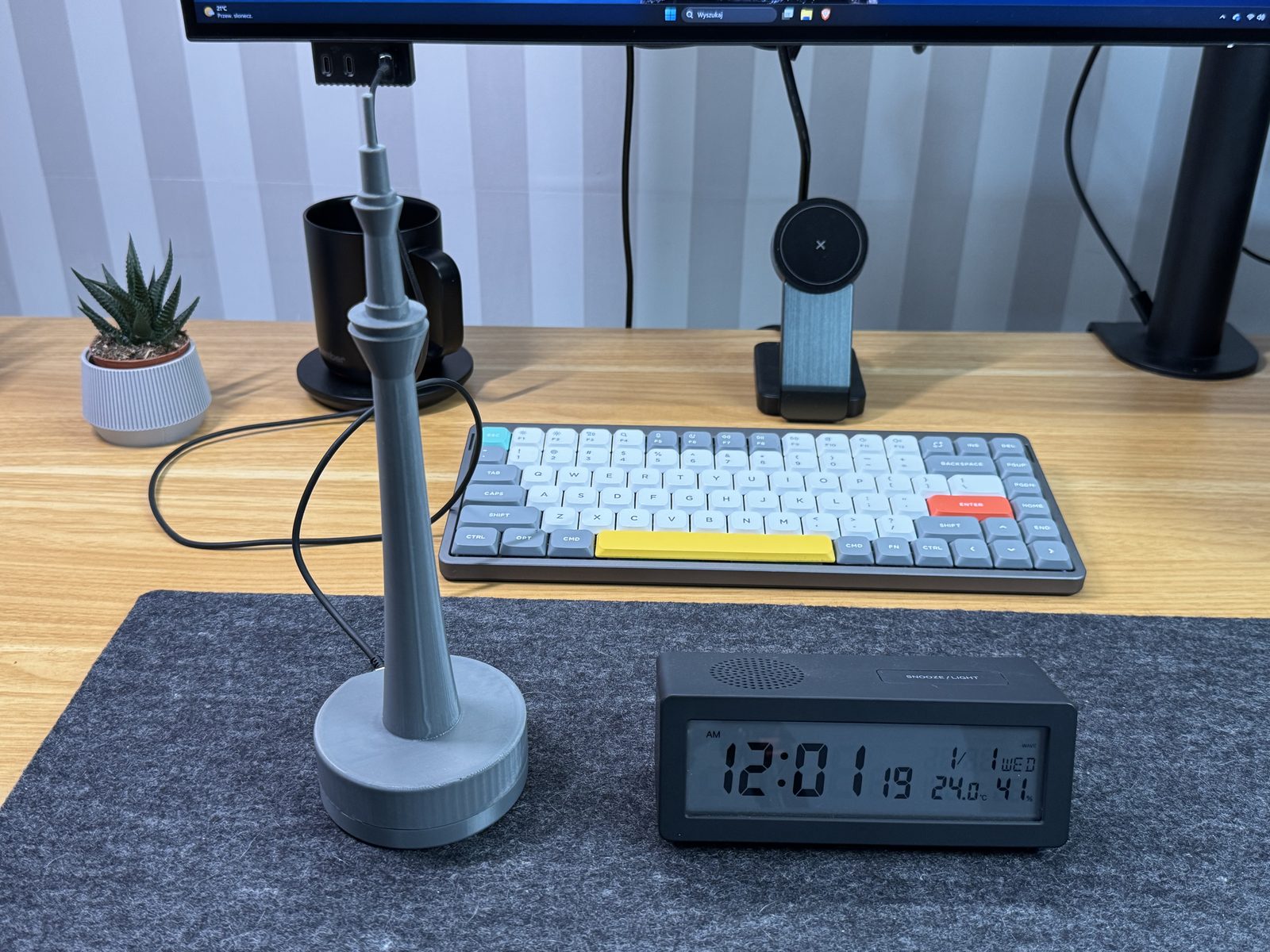
The enclosure is shaped after the Tokyo Skytree — Tokyo’s broadcasting tower, the tallest in Japan, and the primary broadcast hub for the Kanto region. Putting a signal transmitter inside a scale model of a transmission tower felt right. The ferrite rod runs up through the tower body: the structure and the antenna are the same object.
The enclosure is two parts: a base that houses the breadboard, ESP32, and L9110S (secured with screws), and the tower section that friction-fits on top and conceals the coil. On the shelf it reads as a decorative model. Nothing about it says “radio transmitter.”
Printing the Tower
My first attempt was three separate pieces glued together. The joins were visible, the gaps where adhesive didn’t fill looked rough, and it wasn’t what I wanted for something sitting on a desk permanently.
Printing the tower tilted at 45 degrees solved it. The entire structure — base to tip — prints as one part with no joins. Layer lines run cleanly along the taper and the surface finish is night-and-day compared to the glued version. Simple fix once I tried it; obvious in retrospect.
First Sync
After wiring and flashing, I put the firmware into continuous transmission mode and reset the clock to force an immediate sync attempt. A few minutes later the Muji clock’s display updated — correct to the second.
For a first RF project, that moment was hard to beat — a coil of copper wire on a breadboard, and a clock on a shelf updating itself from the signal it was always supposed to receive.
Build It Yourself
A note on regulations: This device intentionally transmits on 40 kHz, which counts as a radio emission regardless of how weak it is. Output is extremely low — the signal barely reaches across a room — but the legality of unlicensed low-power transmitters varies by country. Check your local RF regulations before building.
Difficulty: Intermediate. Through-hole soldering (2 joints on the coil tails), basic breadboard wiring, and firmware flashing via USB. Expect 3–4 hours on the bench plus 6–8 hours print time for the enclosure.
The most common tuning issue is coil inductance being slightly off — winding count variation changes the resonant frequency. Serial commands (+/-) let you adjust the carrier frequency in 10 Hz steps to compensate, so you can tune for your specific coil without reflashing.
Firmware and schematics: → github.com/olafkrawczyk/jjy-simulator
STL files for the enclosure: → MakerWorld
If you build one, share it — @olaf_ky on X.